RM
Ronnie Mbuqe
Author · ExplainItSimply
31 July 2026
15 minute read
English
 The hook
You tap Install and a new tool appears on your phone
It feels like placing an object on a shelf. Your phone is actually receiving a software package, checking it, unpacking it and introducing it to the operating system.
The icon is only the visible front door. Behind it are program files, images, settings and rules about what the app is allowed to do.
The movie sceneImagine the app arriving as a sealed moving box
The app store does not send a fully opened app wandering around your phone. It sends an organised package.
Your phone checks the label, confirms the package belongs on this type of device, verifies that it has not been damaged or secretly changed and then places its contents into controlled locations.
Downloading brings the package to the phone. Installing prepares the package so the phone can use it.
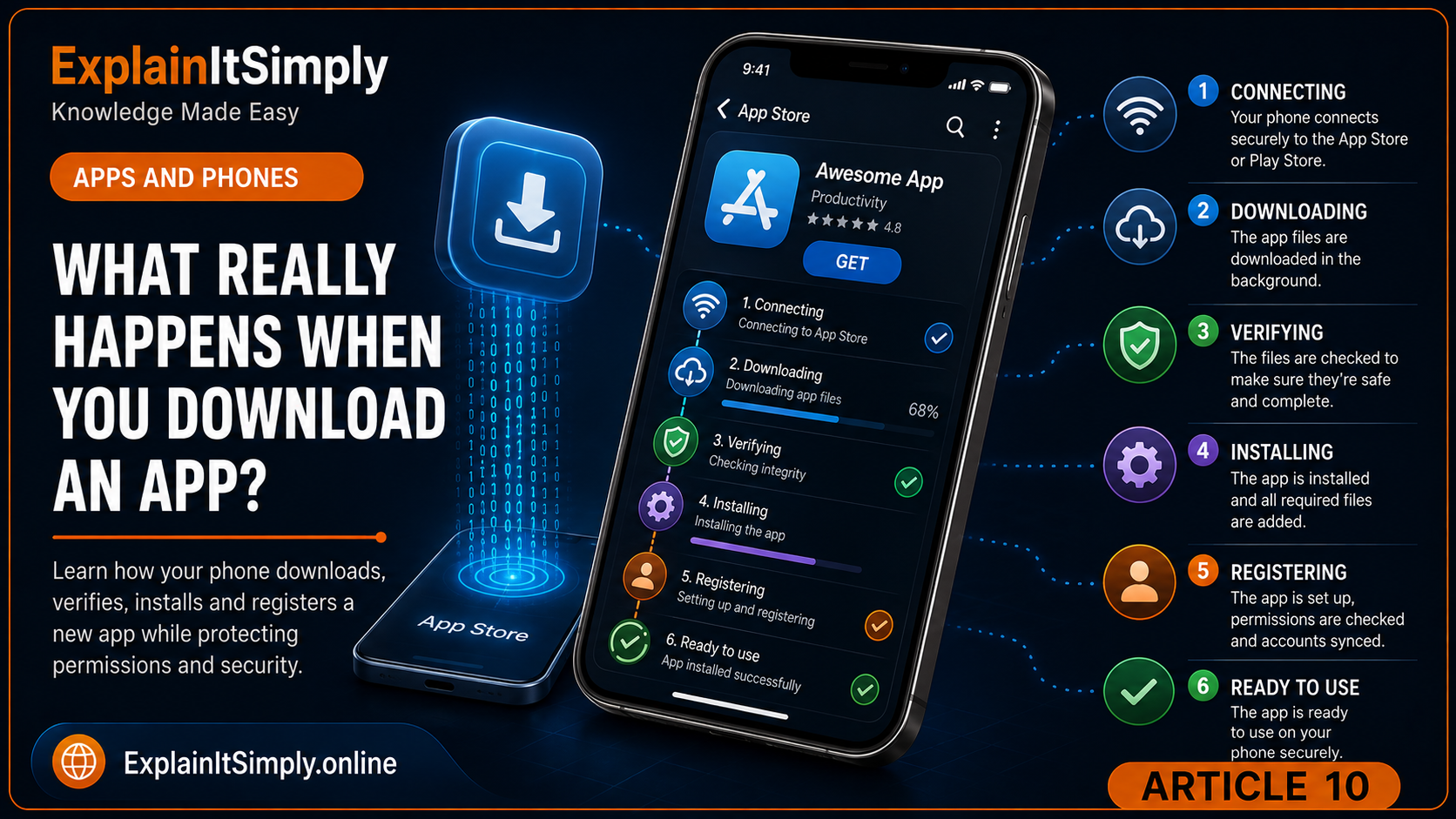
Step by stepFrom app store to home screen
1The store checks compatibility
The app must support the device, operating-system version and region where it is being offered.
2The package downloads
Program files and supporting resources travel across the internet to temporary storage.
3The phone verifies the package
Digital signatures and integrity checks help confirm where it came from and whether it changed during delivery.
4The package is unpacked
The phone prepares the files and registers the app with the operating system.
5The icon and app entry appear
The operating system can now launch the app and manage its storage, permissions and updates.
The downloaded package may be compressed, like clothes packed tightly into a suitcase. Installation expands the contents and the app may later create caches, downloads and user data.
Imagine if...Every app could open everything
A torch app could read contacts. A game could silently use the microphone. A calculator could browse private photos.
Permission systems place doors between an app and sensitive parts of the phone. The app asks; the user or operating system decides whether the door opens.
Permissions do not make every app automatically safe, but they limit access and make important requests visible.
The hidden heroThe invisible room around each app
Mobile operating systems generally try to keep apps in controlled environments. Think of each app as renting its own room instead of owning the entire building.
The app can work with its own files. Reaching shared resources or another app's information requires approved doors and rules.
The first launchWhy does the app ask questions after it is already installed?
Installation prepares the app. First launch begins the relationship with the user.
The app may ask you to sign in, select preferences, allow notifications or grant access to a camera, location or contacts. It may also download fresh content that was not included in the original package.
Why updates matterAn app is never completely frozen
Phones, security threats and online services keep changing. Updates can repair errors, close security gaps, improve performance, add features and maintain compatibility.
An app may look the same after an update while important hidden code has changed underneath.
Where the package came fromWhy the download source matters
An official app store adds checks between the developer and the phone. It can require a registered developer identity, scan submitted packages, verify a digital signature and remove known harmful software. These checks reduce risk, although they cannot promise that every app is perfect.
Installing software from an unknown link removes some of those protective layers. The package may imitate a familiar app, ask for unnecessary permissions or contain code that was never reviewed by the normal distribution service.
The icon and name are not enough to prove an app is genuine. Source, developer and permissions all matter.
After you close the screenCan an installed app still do work in the background?
Some apps need limited background activity to receive messages, finish an upload, update location for navigation or prepare new content. The operating system controls this work because unlimited background activity would drain the battery, use data and weaken privacy.
What looks like one app is often a partnership between code on the phone and services on the internet. Closing the visible screen may end the current interface without deleting the account or every permitted background task.
App, account and dataWhy uninstalling may not delete everything
Local app files live on the phone, while account records may live on the provider's servers. Uninstalling normally removes the local program and managed local data; it does not automatically close an online account, cancel a subscription or erase information the service is legally allowed or required to keep.
If you want to leave a service completely, look for account-deletion and subscription settings as well as the Uninstall button. For more connected software explanations, browse all published articles.
What could go wrong?The internet disconnects halfway through
The store needs to know that the package is incomplete. It can pause, retry or restart the download instead of installing half an app.
Verification also helps prevent a damaged package from being treated as trustworthy software.
And when you uninstall?Removing the icon is only part of the story
The operating system removes the app and its managed files. Some account information may still exist online because an online account and a local installation are different things.
This explains why reinstalling an app can bring back your profile after you sign in again.
From a software developerOne app must live inside a much larger system
Developers do not only design screens. They must respect operating-system rules, storage limits, security permissions, different device sizes, network failures and future updates.
The hidden design problemThe app must feel independent while still behaving like a responsible guest on the phone.
A good app does its job without acting as if it owns the device.
Next time you...See a new icon appear
Remember the arrival process. Your phone downloaded, checked, unpacked, registered and contained a new piece of software.
🤔 The Next Time...
The next time a new app appears on your phone
The icon is only the final step after downloading, verification, installation, registration and permission controls.What did your phone check before deciding that the new software was ready to run?